Integration projects fail the same way every time
Engineers spend weeks configuring individual tags. Under load the system slows without erroring. And whoever investigates it afterward is reconstructing a shift they were not there for.
Those last two are the same failure, not two. Slow is not an error. A transaction that used to complete in 40 milliseconds and now takes 900 still succeeds, so nothing raises an alarm, nothing goes on the error list, and nothing anywhere writes down that it got worse. The degradation is real and completely unrecorded — right up to the shift busy enough to push it past a timeout and stop the line.
By the time anyone is asked to explain it, the evidence is gone. The load that caused it has passed, the shift that saw it has ended, and the person holding the problem is reading logs that recorded only that things finished. Reproducing the conditions is guesswork, and it is guesswork done under pressure, on a line that is down.
And when the process changes, updating the middleware becomes a project of its own — a tag-by-tag audit across every controller, done under time pressure, by the people who were supposed to be doing controls work.
Event Engine® was built to remove all four of those failure modes rather than manage around them.
One hop between your PLCs and your data. Not four.
OPC and ODBC each add a server to run, a configuration to maintain, and the latency of another handshake — plus the lowest-common-denominator limits of a consensus protocol. Event Engine® drives both ends natively, which is where its speed advantage over an OPC stack comes from.
Where a native driver doesn't exist, OPC UA does. A controller outside the Logix, S7 and Modbus families is still a first-class citizen: point Event Engine® at your OPC UA server and everything above this line works unchanged — the same events, the same structures, the same diagnostics. Native by default, OPC UA by exception, and never a mixed plant you have to solve twice.
Getting started
Four steps to your first event
No desktop client. No VPN session. No PLC download.
1 — Import the structure
Point Event Engine® at your PLC and import its structure definitions — UDTs, data blocks, PLC data types — straight from the controller.
2 — Bind the tags you need
Browse the PLC or enter names directly. A 100-element array of a 10-member structure is one definition, not a thousand entries.
3 — Map the event
Point it at your database stored procedure or table. Native drivers call the procedure directly, with no ODBC in the path.
4 — Trigger it and watch
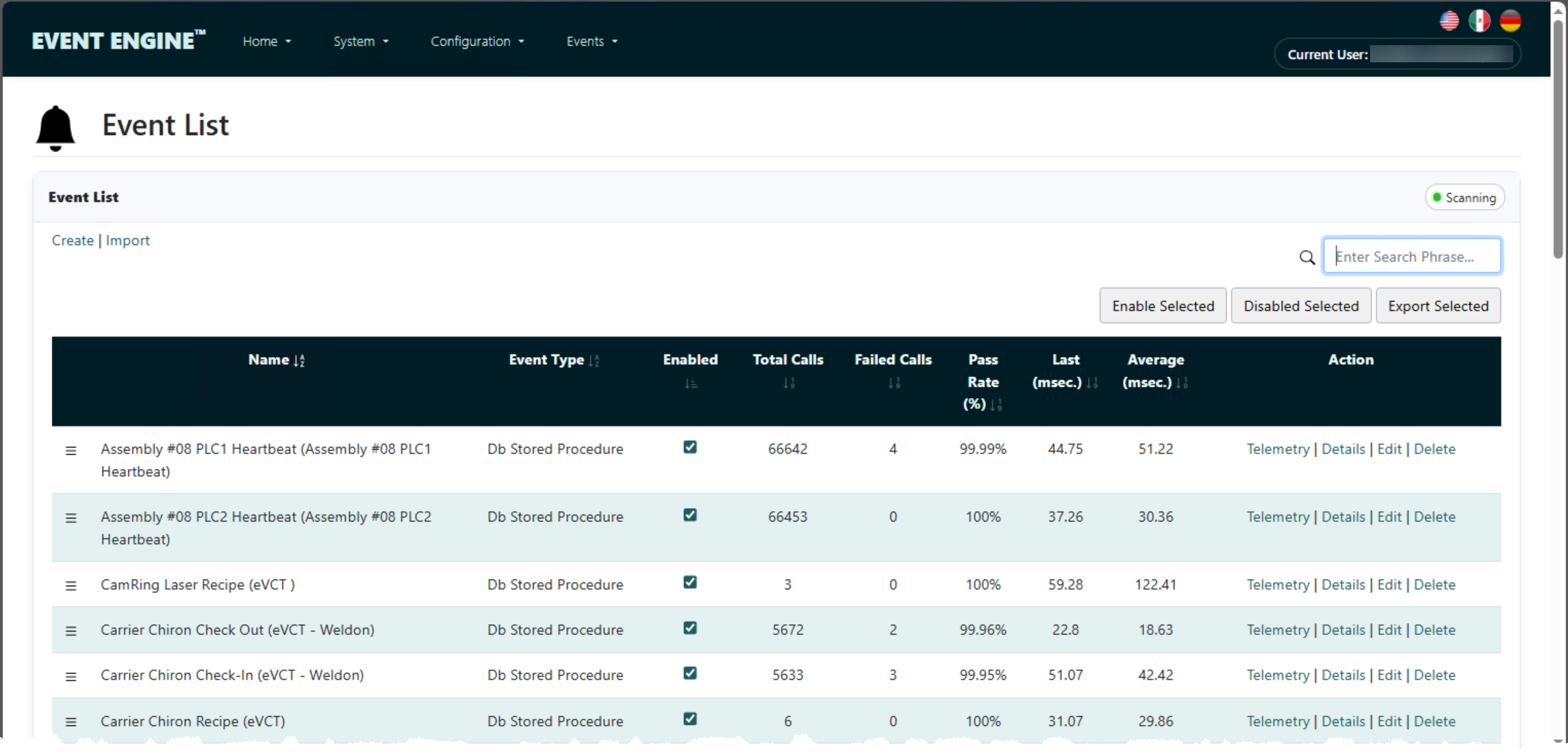
Fire the event and see the result land, with timing and status on the same screen.
Configuration changes are made live, without disturbing the rest of the operations.
Where to go next
Two jobs, two sets of questions
The same engine, read from two ends. Everything below this point on this page is common ground — these two pages answer what is specific to you.
Proof
An hour of lost production a day, recovered
An automotive components manufacturer averaged five events per second — but the process swung between none and thirty-five concurrent.
The peaks were enough to fault events with no assignable cause: dropped records, scrapped parts, missed cycles, and an hour of lost production every day. Months of troubleshooting found nothing, because nothing had recorded anything to find. Event Engine® absorbed the bursts, and let them consolidate several middleware instances onto one.
- Before
- Faulted events with no assignable cause; roughly one hour of lost production per day.
- After
- Bursts handled without fault; multiple middleware instances consolidated onto one.
- Load
- 5 events per second average, swinging between 0 and 35 concurrent.
Put a stopwatch on it
Every middleware vendor says they're fast — fast to build, fast when running. Download the trial and measure it against what you're running now.
Category
What you stop running
The usual plant-floor integration stack is four hops: PLC, OPC server, middleware, ODBC, database. Event Engine® is one.
| OPC + ODBC stack | Buffering middleware | Event Engine® | |
|---|---|---|---|
| Servers between PLC and database | OPC server, middleware, ODBC layer | Middleware plus a queue store | None — native drivers both ends |
| Configuration unit | Individual tags | Individual tags | Whole PLC structures (UDTs, DBs) |
| Behaviour under a burst | Reconnection cost stacks up; events fault | Absorbed into a queue | Warm connections; runs at database speed |
| Does the PLC learn the outcome? | Rarely | Told it was queued, not that it landed | Completed or failed, with status and timestamp |
| A transaction that is getting slower | Succeeds silently until it times out | Succeeds silently until it times out | Flagged against its own baseline, weeks early |
| When something breaks | Logs across three products | Outage window, not a containment | Per-event trace: attempted, returned, stopped |
| Changing a structure | Tag-by-tag audit | Tag-by-tag audit | Re-import once, all instances covered |
Compatibility
Works with what you already run
- Controllers
- Direct drivers for Rockwell Logix, Siemens S7, and Modbus TCP/IP. Any PLC reachable over OPC UA.
- Databases
- Microsoft SQL Server and Oracle, driven natively.
- Destinations
- Databases, PLC data structures, label printers, and SMTP email.
- Triggers
- A PLC tag, a schedule, or an inbound REST call into Event Engine®.
- Platform
- Windows — on-premises or in the cloud. No vendor cloud service required.
- Interface
- Any browser on the plant network, with per-user access control.
- Licensing
- Perpetual or subscription, with an annual maintenance agreement available.
The stack
Event Engine® and IntelliTrack™
Event Engine® moves plant-floor data reliably. IntelliTrack™ turns it into a manufacturing record.
Measurements, process actuals, and recipe values captured per unit and per operation, tied to genealogy, quality, and OEE — available to production, engineering, and quality while the shift is still running. If you are connecting PLCs today because someone will ask a hard question tomorrow, the two are designed to work as one stack.
Each also stands alone. Event Engine® feeds any historian, MES, or database you already run, and IntelliTrack™ accepts data from the systems you already have.
Downloads
Everything you need to evaluate it
Installer, documentation and the commercial terms — all of it, without a form.
- Event Engine® — 30-day trial — fully functional, no credit card, no sales call
- Event Engine® Overview (PDF) — the short version, for circulating
- Event Engine® User’s Guide (PDF) — every screen, and what each option does to the running system
- Event Engine® EULA (PDF) — the licence terms, before you have to ask for them
- Annual Maintenance Agreement (PDF) — support and upgrade coverage
Requires Windows, SQL Server or Oracle, and a PLC or OPC server.